Lesson Layout Help Page
| Feature | Purpose | Include File |
|---|---|---|
| Video Player | Embed YouTube videos responsively | include video.html |
| Code Prompt (Popcorn Hack) | Let students write and run Python/JavaScript code | include hack.html |
| AI Comprehension Checker | Generate practice questions from lesson content | include ai_comprehension.html |
| Feedback Poll | Collect thumbs up/down feedback and comments | include poll.html |
| Flashcards (Static) | Display pre-loaded flashcards from YAML | include flashcards.html |
| Flashcards (Student) | Allow students to create and study their own flashcards | include flashcard-notes.html |
| Live Whiteboard | Display a shared whiteboard session via board code | include whiteboard.html |
| Multiplayer Quiz Game | Real-time competitive quiz with leaderboard | include game.html |
| Interactive Sidebar | Tools for dictionary, notes, highlighting, text-to-speech | include slim_sidebar.html or sidebar.html |
Interactive Lesson Layouts Documentation
Overview
This documentation covers HTML lesson layouts and interactive features for coding education. The system uses Jekyll with various interactive components to create engaging learning experiences.
Core Files
1. lesson.html - Base Template
The foundation template providing:
- Responsive CSS styling with dark theme
- JavaScript for animations and interactivity
- Local storage for student responses
- Code execution capabilities (JavaScript and Python)
- Feedback poll system
Usage: Serves as the base layout - don’t modify directly unless changing global styles.
2. cover.html - Sample Lesson
Example lesson demonstrating feature integration:
---
layout: lesson
title: Introduction to Functions
video_url: https://www.youtube.com/watch?v=zvzjaqMBEso
hack_prompt: "Write a Python function that calculates factorial"
permalink: /lesson-url
---
🎬 Video Player (video.html)
Setup:
- Add
video_url: VIDEO_IDto the lesson frontmatter (YouTube ID only) -
Include the component:
include video.html
Features:
- Responsive YouTube iframe with 16:9 aspect ratio
- HD label with styled container
- Fullscreen and playback control via YouTube interface
Tech Notes:
- Uses `` to extract YouTube ID
- Includes animated entry (
fadeIn,shine) - No external JS required
Live Whiteboard (whiteboard.html)
Teacher Workflow:
- Go to whiteboard.team
- Copy board code from the URL (e.g.,
https://.../board/<code>) - Students enter this code in the input field to join the board
Features:
- Live iframe viewer with full-screen auto-expand
- Sidebar with board input and validation
- Status messages for errors/success
- Restart button to reset board
Technical Notes:
-
Loads board via:
iframe.src = `https://www.whiteboard.team/app/board/${boardCode}` - Supports mobile and desktop fullscreen behavior
- Sidebar is collapsible with animated toggle
- Input sanitization allows alphanumeric codes only
- ESC key triggers restart in fullscreen mode
Here is an example of modularity, where teachers can import different sections as they need:

AI Comprehension Checker
Purpose: Generate AI-powered questions based on lesson content with immediate feedback.
Student Workflow:
- Choose question type: Multiple Choice or Short Answer
- Select difficulty: Easy / Medium / Hard
- Click “Generate Question”
- Submit answer and receive feedback with explanations
Technical Notes:
- Pulls lesson content from
#lesson-contentDOM element - Uses Groq’s
llama3-8b-8192model via API - Accepts JSON-formatted responses for both MCQ and SAQ
- Caches recent questions to avoid duplicates
- Requires a valid Groq API key (
API_KEYinai.html)
Returns:
// For Multiple Choice
{
  "question": "string",
  "options": ["A", "B", "C", "D"],
  "correct_index": 1,
  "explanation": "string"
}

// For Short Answer
{
  "question": "string",
  "sample_answer": "string",
  "explanation": "string"
}
Popcorn Hack (Coding Challenges)
Setup:
Add a hack_prompt key in your lesson frontmatter:
- Responsive YouTube iframe with 16:9 aspect ratio
- HD label with styled container
- Fullscreen and playback control via YouTube interface
Tech Notes:
- Uses `` to extract YouTube ID
- Includes animated entry (
fadeIn,shine) - No external JS required
Live Whiteboard (whiteboard.html)
Teacher Workflow:
- Go to whiteboard.team
- Copy board code from the URL (e.g.,
https://.../board/<code>) - Students enter this code in the input field to join the board
Features:
- Live iframe viewer with full-screen auto-expand
- Sidebar with board input and validation
- Status messages for errors/success
- Restart button to reset board
Technical Notes:
-
Loads board via:
iframe.src = `https://www.whiteboard.team/app/board/${boardCode}` - Supports mobile and desktop fullscreen behavior
- Sidebar is collapsible with animated toggle
- Input sanitization allows alphanumeric codes only
- ESC key triggers restart in fullscreen mode
Here is an example of modularity, where teachers can import different sections as they need:
AI Comprehension Checker
Purpose: Generate AI-powered questions based on lesson content with immediate feedback.
Student Workflow:
- Choose question type: Multiple Choice or Short Answer
- Select difficulty: Easy / Medium / Hard
- Click “Generate Question”
- Submit answer and receive feedback with explanations
Technical Notes:
- Pulls lesson content from
#lesson-contentDOM element - Uses Groq’s
llama3-8b-8192model via API - Accepts JSON-formatted responses for both MCQ and SAQ
- Caches recent questions to avoid duplicates
- Requires a valid Groq API key (
API_KEYinai.html)
Returns:
// For Multiple Choice
{
  "question": "string",
  "options": ["A", "B", "C", "D"],
  "correct_index": 1,
  "explanation": "string"
}

// For Short Answer
{
  "question": "string",
  "sample_answer": "string",
  "explanation": "string"
}
Popcorn Hack (Coding Challenges)
Setup:
Add a hack_prompt key in your lesson frontmatter:
3005a3b (help page updates)
hack_prompt: "Write a function that reverses a string."
Student Features:
- Write and run code in Python or JavaScript
- Switch language with a dropdown selector
- Output is displayed inline
- Local storage saves code response
- Buttons to Save, Clear, and Run Code
Technical Notes:
- Executes JavaScript directly using
eval() - Python runs via Pyodide.js (browser-based interpreter)
- Stores student code in localStorage by prompt hash
Flashcards System
Flashcard System Overview
This system supports two types of flashcards:
- Teacher-Provided (
flashcards.html) – Static content from YAML - Student-Created (
flashcard-notes.html) – Dynamic, user-generated flashcards with full CRUD
flashcards.html: Pre-Loaded Cards
Setup
Define cards in _data/flashcards.yml:
cards:
  - term: Loop
    definition: A programming structure that repeats code
  - term: Variable
    definition: A container for storing data
Include with:
include flashcards.html cards=site.data.flashcards.cards
Key Features
- Flip animation using 3D
rotateY - Progress bar based on known cards
- Mark cards as “Known” or “Review”
-
Local storage (
flashcardsData) tracks:- Current index
- Review status
- Spaced repetition intervals
- Sidebar shows review queue
✍️ flashcard-notes.html: User-Generated Notes
3005a3b (help page updates)
Functionality
-
Users can:
- Add/edit/delete custom flashcards
- Flip cards
- Navigate carousel
- All data saved to
localStorageunderflashcardNotes - Progress bar shows study completion
- Each flashcard contains term/definition + timestamp
Multiplayer Quiz Game (game.html)
Technical stack:
- Frontend: HTML5, Socket.IO, CSS3
- Backend: Flask, Flask-SocketIO
- Content: YAML question files
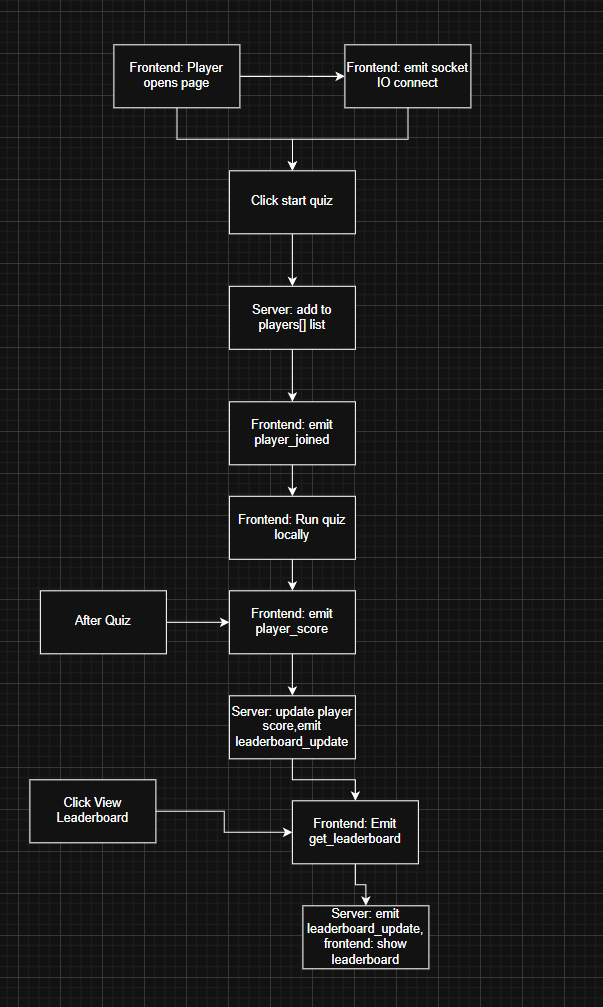
Features:
- Real-time multiplayer competition
- Difficulty-based timing
- Live leaderboard
- Progress tracking
Setup:
- Configure
_data/game_questions.yml - Run Flask backend with Socket.IO
- Update CORS settings for deployment
poll.html: Feedback Poll with Google Sheets Integration
Here is a more technical version of the documentation for the poll.html and sidebar.html components. This is suitable for developers or contributors looking to understand how the modules function and integrate into the larger lesson delivery system.
Overview
The poll.html component collects user feedback using a thumbs-up/down interface, optional text input, and live data visualization via Google Sheets. It is styled with glassmorphism and animated UI elements, providing a modern feedback experience.
Integration Steps
-
Google Form Creation
-
Create a Google Form with:
- A multiple-choice field for “Thumbs Up” or “Thumbs Down”
- A short/paragraph text field for comments
- Use “Form Response” > Google Sheets to link responses.
- Publish the sheet to the web (File → Share → Publish to web).
-
-
Configure the Poll
- Embed the published Google Sheet URL into the
iframein the analytics section of the poll. - Ensure field IDs in
submitFeedback()JS match your form’s input names.
- Embed the published Google Sheet URL into the
-
Live Dashboard
- The response iframe updates live with the published sheet.
- Optionally, auto-refresh functionality can be customized via
refreshData().
Component Structure
-
thumbsUp,thumbsDownbuttons:- Trigger
selectFeedback(direction)and reveal feedback form.
- Trigger
-
feedbackForm:- Contains a
textareaand two buttons: Submit and Reset.
- Contains a
-
submitFeedback():- Sends feedback to the Google Form using a dynamically constructed POST request (not shown in current HTML but should be added for full automation).
-
dataToggle:- Toggles visibility of the analytics iframe.
-
iframe#dataIframe:- Displays the published Google Sheet with embedded analytics.
sidebar.html: Interactive Learning Sidebar
Overview
This sidebar provides in-lesson assistive tools. All operations are performed client-side with persistent local storage. Tools include a dictionary lookup (via dictionaryapi.dev), notes tied to highlights, text-to-speech (via VoiceRSS), and highlight annotations.
Core Functionalities
1. Dictionary Lookup
- Triggered by
#dictionary-button -
Modal opens with:
- Input field →
#dict-input - Search button →
#search-dict
- Input field →
- Uses
fetchto callhttps://api.dictionaryapi.dev/api/v2/entries/en/{word} - Response is parsed and rendered into
#dict-result
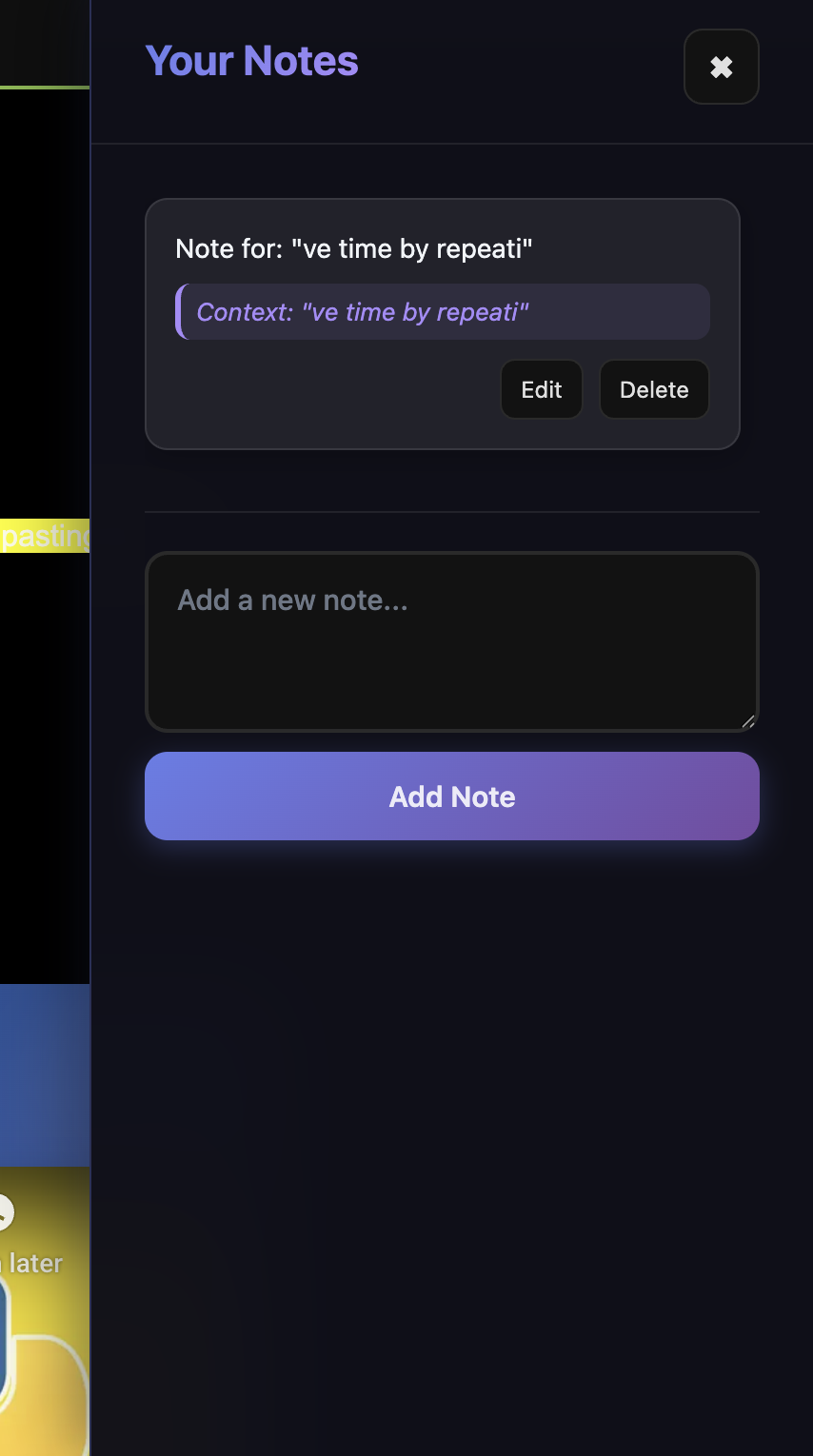
2. Notes with Highlight Context
- Notes are created in the
notes-panelsidebar and linked to specific text highlights. -
Notes store:
id,text,timestamp,highlightId,highlightedText
- Stored in
localStorageunderuserNotes - Notes can be edited, deleted, and auto-scroll to associated highlight in
#lesson-content.
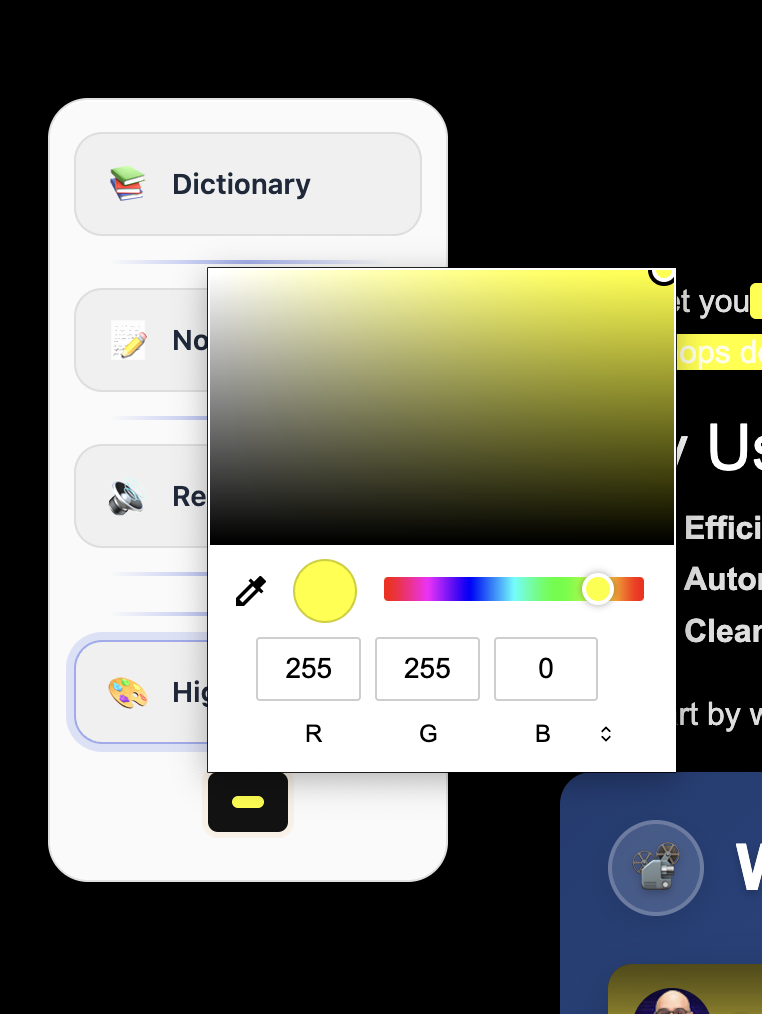
3. Text Highlighting
- Activates on
#highlight-button - Highlights wrap text nodes using
span.user-highlight -
Each highlight includes:
data-highlight-id- Trash icon (
.highlight-trash-icon) to delete highlight - Note icon (
.highlight-note-icon) to attach/edit note
- Highlights persist via
localStorageinlessonHighlights
4. Text-to-Speech
- Triggered by
#tts-button - Reads selected text using VoiceRSS API (
https://api.voicerss.org) - Audio element is created dynamically if not present
- Requires VoiceRSS API key (currently hardcoded)
Local Data Persistence
Notes
localStorage.setItem('userNotes', JSON.stringify(notesData));
Highlights
localStorage.setItem('lessonHighlights', lessonContent.innerHTML);
- Highlights restore on page load
- Script reattaches event listeners after restoration
Quick Start Guide
- Copy
cover.htmlas template for new lessons - Update frontmatter with lesson-specific content:
title: Lesson namevideo_url: YouTube video IDhack_prompt: Coding challengepermalink: Lesson URL
- Customize content within
<div id="lesson-content"> - Add features using
include feature.htmltags - Create supporting files (flashcards.yml, game_questions.yml, etc.)
Best Practices
For Teachers
- Test all interactive features before lessons
- Provide clear instructions for student interactions
- Use different highlight colors for categorization
- Pre-configure API keys and external services
For Students
- Use highlights and notes for active reading
- Practice with flashcards for retention
- Engage with AI comprehension checks
- Provide feedback through polls
Sidebar Which Includes:
Sidebar Features
Sidebar Overview
The interactive sidebar enhances the learning experience by providing quick access to essential tools. It is designed for seamless integration with lesson content.
Components
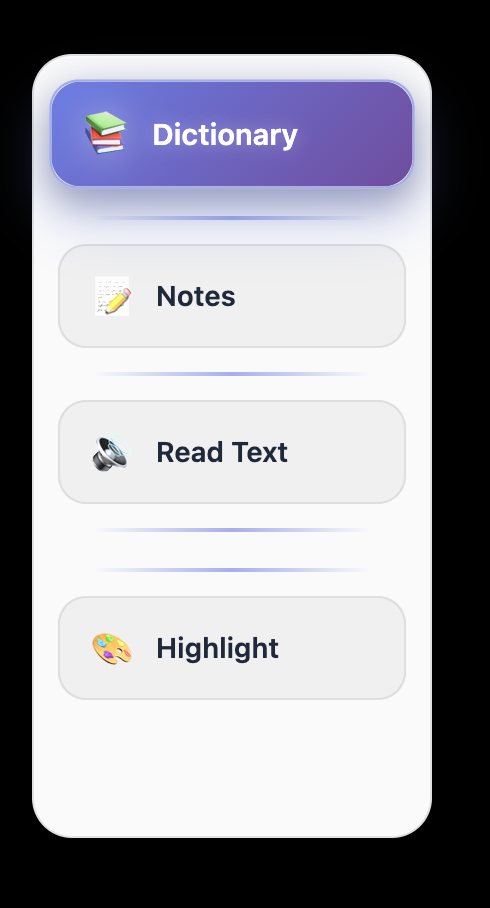
- Notes
- Take personal notes while studying.
- Attach notes to highlighted text for better organization.
- Read Text
- Convert selected text to speech for auditory learning.
- Adjustable playback speed and voice options.
- Highlight
- Mark text with color-coded highlights.
- Categorize highlights for better comprehension.
Student Workflow
- Click sidebar icons to access features.
- Select text for reading or highlighting.
- Add contextual notes linked to highlights.
- All data is stored locally for persistence.
Benefits
- Encourages active reading and note-taking.
- Supports multimodal learning styles.
- Improves retention through interactive tools.
- Provides a personalized study experience.
Technical Requirements
- Jekyll static site generator
- Modern web browser with JavaScript enabled
- External API keys (Groq, VoiceRSS) for advanced features
- Google Forms/Sheets for feedback collection
- Flask backend for multiplayer features
Future Development Goals
This layout system currently relies on client-side storage (e.g., localStorage). The next major evolution will involve a Flask backend and database for persistent user data.
Account System
- Enable teacher/student accounts
- Track login sessions using Flask-Login or JWT
- Role-based permissions for viewing data
Database Features
- PostgreSQL or MongoDB for storing:
- Flashcards (static and student-generated)
- AI quiz responses
- Code prompt submissions
- Highlighted notes and dictionary lookups
- Poll and feedback results
- Multiplayer quiz history
Teacher Dashboard
- View individual and class-level progress
- Award digital tokens or badges based on activity
- Review student responses from AI and code prompts
- Set due dates and lock/unlock lesson features
This roadmap enables a more personalized, gamified, and analytics-rich learning experience built on top of your existing modular layouts.
File Structure
├── _layouts/
│   └── lesson.html
├── _includes/
│   ├── video.html
│   ├── whiteboard.html
│   ├── ai_comprehension.html
│   ├── hack.html
│   ├── flashcards.html
│   ├── flashcard-notes.html
│   ├── game.html
│   └── poll.html
├── _data/
│   ├── flashcards.yml
│   └── game_questions.yml
└── lessons/
    └── cover.html
This system provides a comprehensive, interactive learning environment that engages students through multiple modalities while giving teachers powerful tools for content delivery and assessment.