Frontend Architecture for Tower Defense Game
Tower Defense Frontend Code Overview
1. HTML Structure
- Help Section: Explains gameplay, tower placement, upgrades, coins, and tips.
- Points Display: Shows player points (top left).
- Coin Display: Shows player coins (top right).
- Health Bar: Shows player health (centered above the game area).
- Game Container: Main area where the game is rendered.
- Tower Menu: Appears below the map for dragging towers onto the field.
2. Styling (CSS)
- Dark Theme: Black background, white borders, and colored highlights.
- Game Area: Fixed size, background image, and border.
- Towers/Enemies: Absolutely positioned, with z-index layering.
- Health Bar: Gradient color changes based on health.
- Points/Coins: Styled for visibility and contrast.
- Tower Radius: Dashed circles show tower attack range.
3. JavaScript Functionality
Constants & Utilities
- Tower and Enemy Data: Arrays define tower types, images, costs, and radii.
- Path Points: Array of coordinates for enemy movement.
- Utility Functions:
lerp(linear interpolation),dist(distance calculation).
Points API Integration
- Class
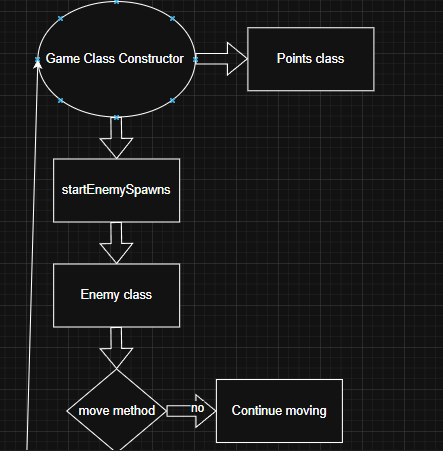
Points: Handles fetching, updating, and displaying player points from a backend API. Points auto-increment every 20 seconds.
Game Classes
- Enemy: Handles enemy movement along the path, health, death, and DOM updates.
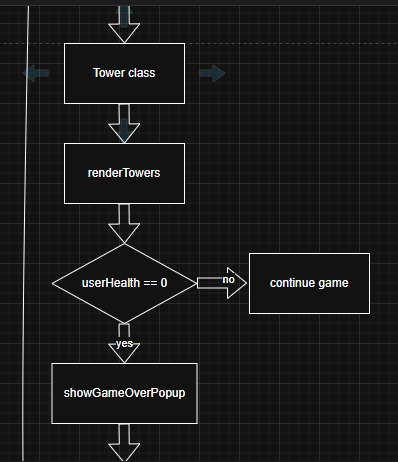
- Tower: Represents a placed tower, stores its type, position, and state.
- Projectile: Animates projectiles from towers to enemies, applies damage on hit.
- Game: Main controller for game state, UI, enemy spawning, tower placement, upgrades, and attack logic.
- Upgrades: Handles tower upgrades, applying new abilities and stats per level.
Gameplay Logic
- Enemy Spawning: Multiple enemy types spawn at intervals, with increasing difficulty.
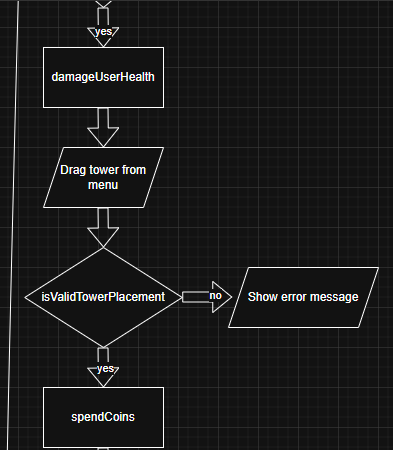
- Tower Placement: Drag-and-drop from the menu, with checks to prevent invalid placement (e.g., on the path or overlapping).
- Tower Attacks: Each tower type has unique attack logic (e.g., lasers, projectiles, AoE, support buffs).
- Upgrades: Towers can be upgraded up to level 5, unlocking new abilities and increasing stats.
- Health & Game Over: Player loses health when enemies reach the end. Game over popup appears when health is zero, with a restart option.
UI Interactions
- Tower Menu: Drag towers onto the map.
- Upgrade Button: Click a tower to upgrade if enough coins.
- Dynamic UI: All elements update in real-time (coins, health, points, tower visuals).
Event Handling
- Drag-and-Drop: For tower placement.
- Click Events: For upgrades and restarting after game over.
- Responsive Positioning: Coin and points displays reposition on window resize.
4. External Assets
- Images: Towers, enemies, projectiles, and background are loaded from external URLs.
Summary:
The code implements a feature-rich, interactive Tower Defense game in the browser using vanilla JavaScript, HTML, and CSS. It supports OOP design, real-time DOM manipulation, drag-and-drop UI, API integration for points, and a robust upgrade system for towers.
5. Technical Illustrations